
Dunkin’ App: Download, Features & Rewards (2026)
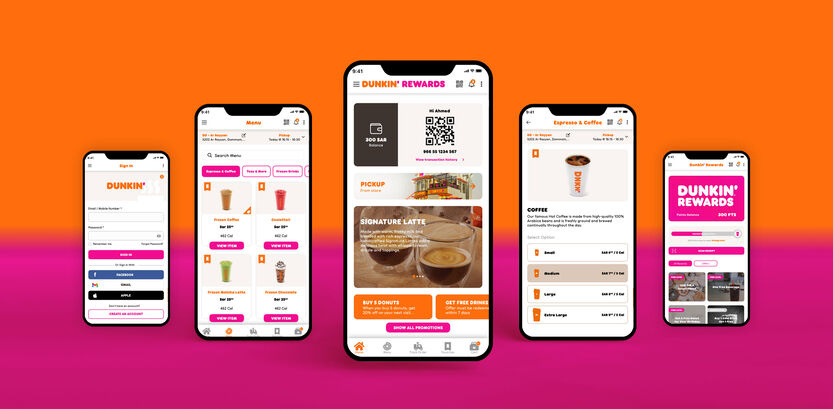
The Dunkin’ App makes it easier for customers in the United States to explore the Dunkin’ menu, customize drinks and food, place mobile orders, and participate in Dunkin’ Rewards. Depending on the participating location, customers can order ahead, pay through the app, save favorite orders, and access available offers.
Whether you want to install the Dunkin’ app for the first time, sign in to an existing account, or learn how its rewards program works, this guide explains the essential steps.
To explore menu categories and estimated prices before placing an order, visit our Dunkin’ Menu with Prices guide.
What Is the Dunkin’ App?
The Dunkin’ App is the official mobile application from Dunkin’. It is designed to make ordering and managing your Dunkin’ purchases more convenient from a compatible smartphone.
Customers can use the app to browse available menu items, select a nearby participating restaurant, customize eligible drinks and food, and place orders for pickup where mobile ordering is available.
The app also connects customers with Dunkin’ Rewards, the brand’s loyalty program. Members can earn points on qualifying purchases, view available promotions, and redeem eligible points for food and drinks according to the program’s current terms.
You can learn more and find official download options on the Dunkin’ Mobile App page.
How Does the Dunkin’ App Work?
The app combines menu browsing, mobile ordering, payment options, and rewards in one place. Although the exact features can vary by location and account, the usual process is straightforward.
1. Open the App
After installing the app, open it on your smartphone. You can explore the available options and choose to sign in or create an account.
2. Choose a Dunkin’ Location
Select a participating restaurant near your destination. Check the location and available pickup options before placing an order because mobile ordering is not available at every location.
3. Browse the Menu
Explore available coffee, espresso drinks, Refreshers, donuts, breakfast sandwiches, bagels, and other menu items. Availability may differ between restaurants.
4. Customize Your Order
Choose from the customization options shown for an eligible item. Depending on the product, you may be able to adjust drink size, milk, flavor, or other ingredients.
5. Review and Pay
Add your selections to the cart, review the order, and choose from the payment methods offered at checkout. Confirm the restaurant and pickup instructions before submitting your order.
6. Pick Up Your Order
Follow the app’s pickup instructions when your order is ready. Available methods may include in-store pickup or other options supported by the selected restaurant.
7. Earn and Use Rewards
Sign in to your Dunkin’ Rewards account to track eligible points and available offers. Qualifying purchases earn points according to the current program rules, and eligible rewards can be selected through the app.
How to Install the Dunkin’ App
You can install the official Dunkin’ app on a compatible iPhone or Android phone. The safest approach is to use your device’s official app store rather than downloading an APK from an unfamiliar website.
How to Download the Dunkin’ App on iPhone
- Open the Apple App Store on your iPhone.
- Search for Dunkin’.
- Check that the app is published by the official Dunkin’ developer.
- Tap Get and authenticate if your device requests it.
- Wait for the installation to finish.
- Open the app and follow the on-screen instructions to sign in or register.
Official download information: Visit Dunkin’s official Mobile App page for information about its app and supported features.
App availability and features may vary by country and region. If the app is unavailable in your App Store, check Dunkin’s official website for supported options.
How to Download the Dunkin’ App on Android
- Open the Google Play Store.
- Search for Dunkin’ or visit the Dunkin’ app listing on Google Play.
- Verify the developer and app details before installing.
- Tap Install.
- Allow the installation to complete.
- Open the app and sign in or create an account.
Important: App availability and compatibility depend on your country, device, and app-store settings. If the official app does not appear in your store, check Dunkin’s official website for supported options. Avoid unofficial APK downloads that could put your device or account at risk.
How to Sign In to the Dunkin’ App
If you already have a Dunkin’ account, you can use your existing credentials to access supported account features.
Follow these steps:
- Open the Dunkin’ App.
- Select the Sign In or account option shown on the screen.
- Enter the email address associated with your account when requested.
- Follow the prompts to continue. Depending on the current sign-in process, you may be asked for your password or another verification step.
- Complete any required verification.
- Once signed in, open your account or rewards section to review your available points, offers, and account information.
You can also visit the official Dunkin’ website and select its account or sign-in option.
How to Create a Dunkin’ Account
New users can register through the app or the official website.
- Open the Dunkin’ App.
- Select the option to join Dunkin’ Rewards or create an account.
- Enter the requested information, which may include your name, email address, mobile number, and a password.
- Provide any optional information you want to use for eligible birthday offers or location-specific promotions.
- Review the applicable terms and privacy information.
- Submit your registration and complete any required verification.
Once your account is ready, sign in to access the features available to your membership.
What If You Cannot Sign In?
If the Dunkin’ app will not let you sign in, try these troubleshooting steps:
- Check your email address: Make sure it is the one linked to your account.
- Reset your password: Use the password-reset option or follow the instructions on Dunkin’s official website.
- Check your internet connection: Switch between Wi-Fi and mobile data to see whether the problem continues.
- Update the app: Install any available update from the official app store.
- Restart the app: Close it completely and reopen it.
- Check for service issues: Try again later if the app or website is temporarily unavailable.
- Contact official support: If you still cannot access your account, use Dunkin’s official Contact Us page.
Never share your password or verification codes with someone claiming to fix your account through an unofficial channel.
Benefits of Using the Dunkin’ App
The Dunkin’ App offers several useful features for customers who regularly visit participating Dunkin’ restaurants.
1. Order Ahead
Mobile ordering lets you submit an eligible order before arriving at a participating restaurant. This can make pickup more convenient during a busy morning or lunch break.
2. Customize Food and Drinks
Choose from the available options to personalize eligible beverages and food. The selections offered depend on the menu item and restaurant.
3. Earn Dunkin’ Rewards Points
Members can earn points on qualifying purchases under the current Dunkin’ Rewards program. The official rewards page explains how points are earned and which rewards are available.
4. Redeem Eligible Rewards
Eligible members can use accumulated points toward available food and drink rewards. Point requirements, eligible items, and redemption conditions can change, so check the rewards catalog in the app.
5. Access Offers and Promotions
The app can display member offers and promotions. Some offers may have expiration dates, purchase requirements, or location restrictions.
6. Save Favorite Orders
The app supports saving favorite orders and reordering previous selections, helping returning customers place familiar orders more quickly.
7. Choose a Preferred Restaurant
You can select a participating Dunkin’ location for your order. Checking the selected restaurant helps you confirm its menu, pickup options, and availability before checkout.
8. Manage Eligible Payment Options
Depending on your account and location, the app may support payment with an enrolled Dunkin’ Card or other payment methods displayed at checkout. Available options can vary.
For the latest feature information, visit the official Dunkin’ Mobile App page.
Dunkin’ App and Dunkin’ Rewards: What Is the Difference?
The Dunkin’ App is the mobile application used to access supported digital services. Dunkin’ Rewards is the loyalty program that allows eligible members to earn points and redeem them for qualifying items.
| Feature | Dunkin’ App | Dunkin’ Rewards |
|---|---|---|
| Browse available menu items | Yes | Not its main purpose |
| Place supported mobile orders | Yes | Members can order through the app |
| Customize eligible orders | Yes | Not its main purpose |
| Earn qualifying purchase points | Through eligible transactions | Core program benefit |
| View and redeem eligible rewards | Yes | Core program benefit |
| Access available member offers | Yes | Offers may be linked to membership |
You do not need to confuse installing the app with joining the rewards program. Installing gives you the application; creating or signing in to an account lets you access account-based features and enroll in rewards where supported.
Is the Dunkin’ App Free?
Downloading the official Dunkin’ App is generally free. However, food and drinks are not free simply because you have installed the app.
You may need to pay for your order, and your bank, mobile carrier, or payment provider may apply its own charges. Rewards and promotional offers are subject to their individual terms and eligibility requirements.
Is the Dunkin’ App Available Outside the United States?
Availability depends on the country, app store, and Dunkin’ services supported in that market. The US version’s mobile ordering, payment, rewards, and promotional features should not be assumed to work in every country.
If you are outside the United States, check your app store and Dunkin’s official website before attempting to register. A US rewards account or US mobile-ordering feature may not be available for use in your location.
Frequently Asked Questions About the Dunkin’ App
1. What is the Dunkin’ App used for?
The app allows customers to browse available menu items, customize eligible orders, place mobile orders at participating locations, access payment options, and use Dunkin’ Rewards features.
2. Where can I download the Dunkin’ App?
Download it through the Apple App Store or Google Play Store when available for your device and region. You can also start at Dunkin’s official Mobile App page.
3. How do I sign in to the Dunkin’ App?
Open the app, select Sign In, enter the email address associated with your account, and follow the current on-screen instructions. Complete any password or verification step requested.
4. Can I use the Dunkin’ App without creating an account?
Some ordering experiences may offer guest checkout, depending on the current app and location. However, account-based features such as managing your membership and accessing your personal rewards require an appropriate account.
5. Does the Dunkin’ App offer free food or drinks?
The app provides access to eligible rewards and promotions. Free items are not automatically included with installation; you must meet the applicable offer or points requirements.
6. How do I earn points with Dunkin’ Rewards?
Join Dunkin’ Rewards and make qualifying purchases using an eligible method, such as ordering through the app or scanning your rewards ID in-store under the program rules. Check the official rewards terms for current earning requirements.
7. Why is the Dunkin’ App not working?
Possible causes include a weak internet connection, an outdated app, a temporary service problem, or a device compatibility issue. Check for updates, restart the app, and try again. Contact Dunkin’ support if the problem continues.
8. How do I reset my Dunkin’ password?
Use the password-reset or account-recovery option provided by the app or official Dunkin’ website. Follow the instructions sent through the supported recovery process.
9. Can I pay through the Dunkin’ App?
The app supports eligible payment options, which may include an enrolled Dunkin’ Card and other methods displayed during checkout. The options available depend on the current app and location.
10. Can I order Dunkin’ for pickup?
Yes, mobile ordering is available at participating locations. Select your restaurant, check the pickup methods offered, submit your order, and follow the app’s pickup instructions.
11. Are Dunkin’ App offers available at every restaurant?
Not necessarily. Offers, menu items, prices, and mobile-ordering availability can vary by restaurant and promotion. Review the terms of an offer and your selected location before ordering.
12. Is the Dunkin’ App available for Android and iPhone?
The official app is offered for compatible Android and Apple devices in supported markets. Check the appropriate app store for current compatibility and availability.
Final Thoughts
The Dunkin’ App brings mobile ordering, menu customization, account access, and Dunkin’ Rewards features together in one convenient place. It can be particularly useful for customers who regularly visit participating restaurants and want to save favorite orders or check available offers.
For the best experience, download the official app, verify your selected restaurant before ordering, and review the current rewards terms. If you need help signing in, use Dunkin’s official account-recovery and customer-support options rather than unofficial services.
Useful official links:
MenuScoutUSA is an independent informational website and is not affiliated with or endorsed by Dunkin’.